Live

Results Portal

Secure lab results, reviewed by your team and delivered to your patients.

Lab reports arrive, your staff review and release them, and patients see their results in a clear, secure dashboard, with markers tracked over time and retest reminders sent automatically.

Results Portal

A results dashboard patients understand

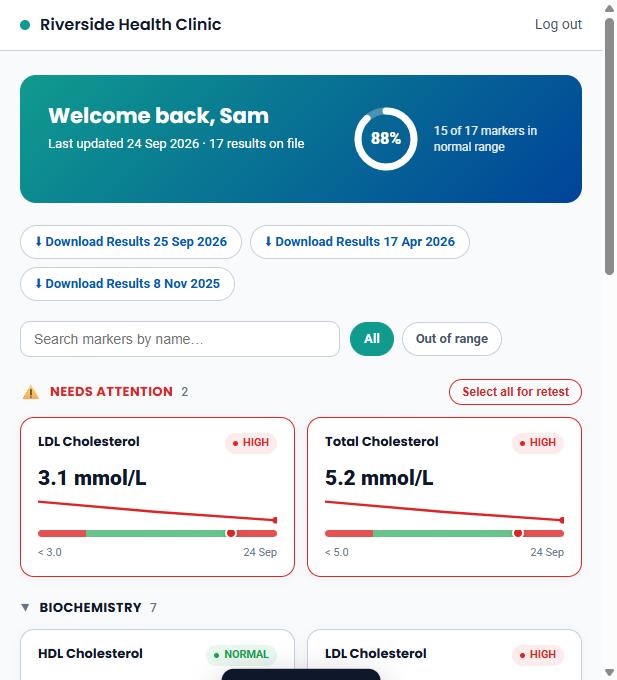
Patients see every marker as a simple card: their value, where it sits in the reference range and which way it is heading. Anything out of range is pulled to the top.

  • Out-of-range markers shown first
  • Markers grouped by category, with search
  • Download the full lab report as a PDF
Patient results dashboard with markers in and out of range
Results Portal

Every marker, tracked over time

Open any marker to see how it compares with the last test, a chart of every result against the normal range, and a short plain-English explanation of what it measures.

  • Change since the last test
  • History chart with the normal range shaded
  • A plain-English note on what each marker measures
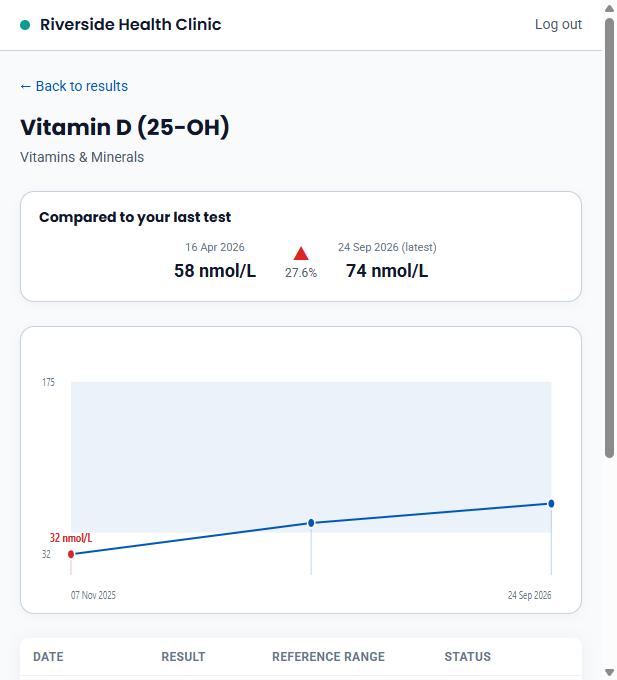
Marker history chart showing vitamin D results over three tests
Results Portal

New reports land ready for review

Reports from the laboratory are imported automatically and matched to the patient. Your team sees what has arrived, how many markers are out of range, and sends each report when ready.

  • Lab reports imported automatically
  • Out-of-range count on every report
  • Recent, sent, waiting and unmatched reports in tabs
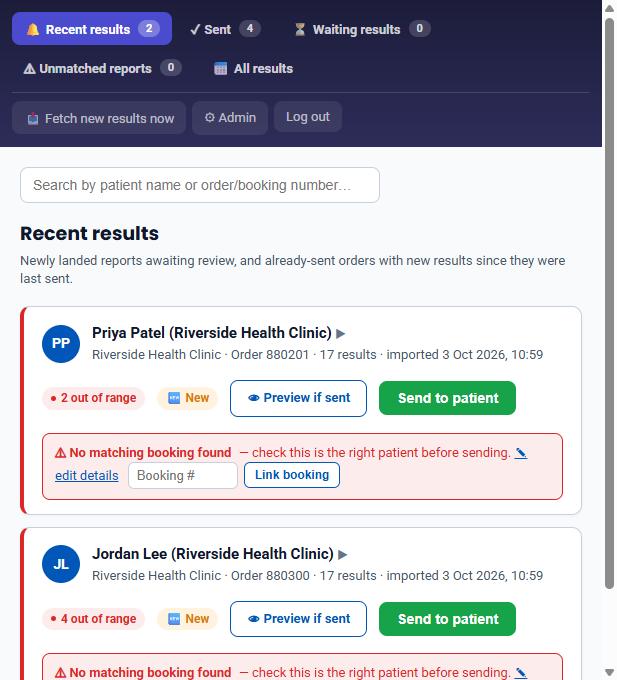
Staff dashboard listing new lab reports awaiting review
Results Portal

Nothing reaches a patient unchecked

Each report is checked against the original booking before it is sent. Staff can open the results, preview exactly what the patient will see, and only then send it.

  • Warns when a report does not match a booking
  • Preview the patient view before sending
  • Patients emailed as soon as results are released
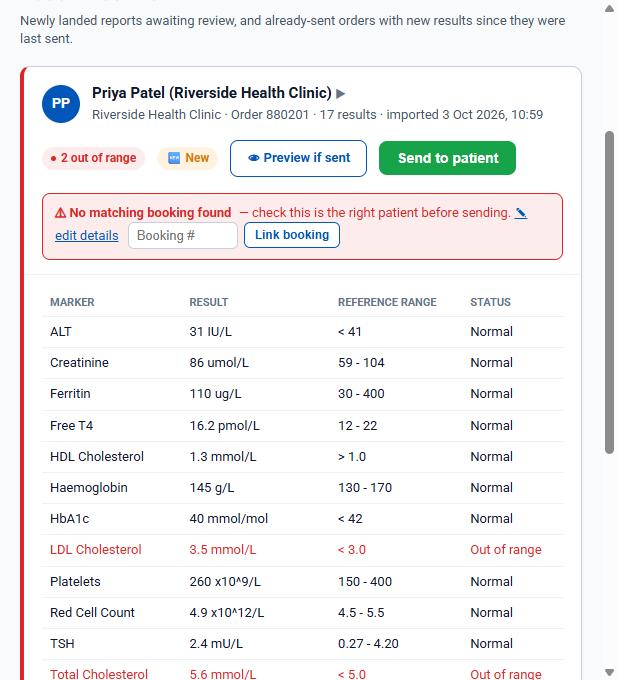
Lab report open for staff review before release to the patient

Screenshots from a demo clinic with made-up patients.

Why clinics use it

Less admin for your team, more clarity for patients

Results delivered safely, in your name, without the phone calls.

Fewer results calls

Patients see their results and what they mean online, without phoning the clinic.

Safer release

Every report is reviewed by your team and checked against the booking before it is sent.

Patients come back

Retest reminders bring patients back for monitoring at 3, 6, 9 or 12 months.

No manual data entry

Laboratory reports are read and imported automatically.

Secure by design

An encrypted results database, HTTPS throughout, and each clinic sees only its own patients.

Your brand, not ours

Patients sign in from your website and see your clinic's name on their results.

Online blood test results for your patients

Patients increasingly expect to see their blood test results online rather than waiting for a phone call or a letter. The Results Portal gives your clinic or pharmacy a secure patient results portal, so each patient can see every marker, whether it is in range and how it has changed since their last test.

Review before release

Results are never published automatically. New lab reports wait for your team, who can check the results, confirm the report matches the right booking and preview the patient view before releasing it. Interim reports and later updates are handled too, so patients are told when new results are added.

Built for monitoring

For patients on long-term monitoring, such as cholesterol, thyroid, vitamin D or testosterone, the marker history makes trends easy to follow. Scheduled retest reminders and a one-click retest request for out-of-range results help patients stay on track.

What you get today

  • Staff review and release before patients see anything
  • Lab reports imported automatically, with no manual data entry
  • Reports cross-checked against the original booking
  • Patient dashboard with in-range and out-of-range markers
  • Marker history and trend charts across tests
  • Plain-English explanation of each marker
  • Release emails, plus notices when results are updated
  • Retest reminders at 3, 6, 9 or 12 months
  • Encrypted results database
  • Patients sign in straight from your website

Coming next

  • Results received directly from the laboratory's software (LIS integration)
Works with

Connect Results Portal to the rest of Sendral

FAQ

Results Portal: common questions

What is a patient results portal?

A secure website where patients see their lab results online. Each marker is shown with its reference range, highlighted if out of range, and tracked across tests.

Do patients see results before staff review them?

No. New reports wait for your team, who review them, preview the patient view and then release them. Nothing is sent automatically.

How do results get into the portal?

Results are received from the laboratory and imported automatically, then matched to the right patient, with no manual data entry. Staff can also fetch new results on demand.

How do you stop results going to the wrong patient?

Each report is cross-checked against the original booking. If it cannot be matched, staff are warned and can link it to the correct booking before anything is sent.

Can patients see how their results change over time?

Yes. Each marker has a history chart across tests, the change since the last test, and a short plain-English explanation of what it measures.

How are patients told their results are ready?

Patients are emailed as soon as your team releases a report, and again if further results are added to it later.

How do patients sign in?

Patients sign in straight from your clinic website with their existing account, without a separate username or password for the portal.

Can it remind patients to retest?

Yes. Staff can schedule a reminder at 3, 6, 9 or 12 months, and patients can request a retest for any out-of-range result from their dashboard.

Is there an API for results?

Not for raw results data. Patient results stay inside the portal, and patients reach them through a secure sign-in link from your website rather than results being copied into other systems.

How is patient data kept secure?

Results are stored in an encrypted database, every connection runs over HTTPS, and each clinic only ever sees its own patients. Staff access is role-based.

See Results Portal with your own setup

Tell us about your clinic or pharmacy and we'll walk you through it.

Book a demo